Numbers alone don't tell the story of an algorithm. A strategy that returns 40% annually could have achieved that through consistent gains — or through a handful of lucky outliers masking a string of losses. Charts turn raw trade data into insight: you see how the money was made, not just how much.
Platforms like mmt.gg set the benchmark for how algo performance should be visualised — clean, information-dense, instantly readable. This post covers the two charts you absolutely need on any trading dashboard: the Equity Curve and the Trade Distribution Histogram.
1. Equity Curve
The equity curve is the single most important chart in algo trading. It plots cumulative profit and loss over every closed trade, giving you an instant read on strategy health.
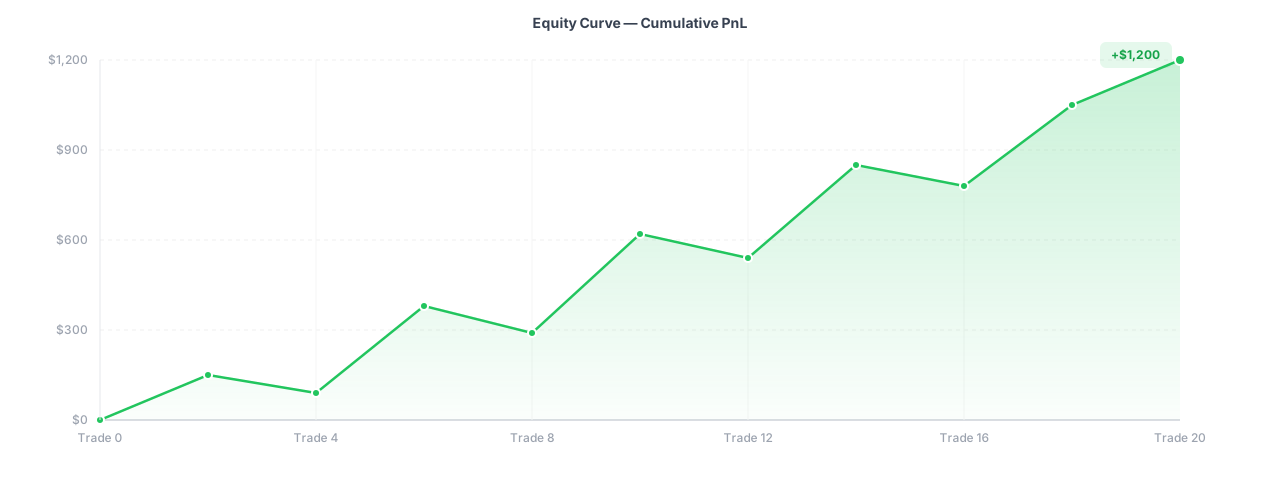
Equity curve — cumulative PnL across sequential trades
What to look for
- Smooth upward slope → consistent edge, low variance
- Frequent new highs with shallow dips → good risk-adjusted return
- Long flat stretches → drawdown periods; strategy struggling to find edge
- Sharp spike then cliff → curve-fitting, one lucky trade, or blow-up risk
mmt.gg shades the area under the curve in green when equity is at an all-time high and red during drawdown periods — a pattern worth replicating. It makes recovery periods visible at a glance without a separate chart.
Data shape
// Each point = one closed trade
type EquityPoint = {
  tradeIndex: number;   // sequential trade number
  pnl: number;          // this trade's profit / loss
  cumPnl: number;       // running total
  timestamp: string;    // ISO date string (optional, for x-axis labels)
};

// Build from raw trades
function buildEquityCurve(trades: { pnl: number; closedAt: string }[]): EquityPoint[] {
  let running = 0;
  return trades.map((t, i) => {
    running += t.pnl;
    return {
      tradeIndex: i + 1,
      pnl: t.pnl,
      cumPnl: parseFloat(running.toFixed(2)),
      timestamp: t.closedAt,
    };
  });
}
React + Recharts implementation
Install Recharts if you haven't already:
npm install recharts
import {
  AreaChart, Area, XAxis, YAxis, Tooltip,
  CartesianGrid, ResponsiveContainer, ReferenceLine,
} from "recharts";

type EquityPoint = {
  tradeIndex: number;
  cumPnl: number;
  timestamp: string;
};

type Props = { data: EquityPoint[] };

export function EquityCurve({ data }: Props) {
  const isPositive = (data.at(-1)?.cumPnl ?? 0) >= 0;
  const color = isPositive ? "#22c55e" : "#ef4444";

  return (
    <div className="rounded-xl border border-gray-100 dark:border-zinc-800 p-4 bg-white dark:bg-zinc-900">
      <h3 className="text-sm font-semibold text-gray-700 dark:text-gray-300 mb-4">
        Equity Curve
      </h3>

      <ResponsiveContainer width="100%" height={280}>
        <AreaChart data={data} margin={{ top: 8, right: 12, left: 0, bottom: 0 }}>
          <defs>
            <linearGradient id="equityGradient" x1="0" y1="0" x2="0" y2="1">
              <stop offset="5%"  stopColor={color} stopOpacity={0.2} />
              <stop offset="95%" stopColor={color} stopOpacity={0}   />
            </linearGradient>
          </defs>

          <CartesianGrid strokeDasharray="3 3" stroke="#f0f0f0" />
          <XAxis
            dataKey="tradeIndex"
            tick={{ fontSize: 11, fill: "#9ca3af" }}
            tickLine={false}
            axisLine={false}
            label={{ value: "Trade #", position: "insideBottom", offset: -4, fontSize: 11, fill: "#9ca3af" }}
          />
          <YAxis
            tick={{ fontSize: 11, fill: "#9ca3af" }}
            tickLine={false}
            axisLine={false}
            tickFormatter={(v) => `$${v}`}
          />
          <Tooltip
            contentStyle={{
              background: "#18181b",
              border: "1px solid #3f3f46",
              borderRadius: 8,
              fontSize: 12,
            }}
            labelFormatter={(label) => `Trade #${label}`}
            formatter={(value: number) => [`$${value.toFixed(2)}`, "Cum. PnL"]}
          />
          <ReferenceLine y={0} stroke="#6b7280" strokeDasharray="4 2" strokeWidth={1} />
          <Area
            type="monotone"
            dataKey="cumPnl"
            stroke={color}
            strokeWidth={2}
            fill="url(#equityGradient)"
            dot={false}
            activeDot={{ r: 4, strokeWidth: 0 }}
          />
        </AreaChart>
      </ResponsiveContainer>
    </div>
  );
}
Usage
const rawTrades = [
  { pnl: 120,  closedAt: "2024-01-03" },
  { pnl: -45,  closedAt: "2024-01-07" },
  { pnl: 310,  closedAt: "2024-01-11" },
  { pnl: -180, closedAt: "2024-01-15" },
  { pnl: 95,   closedAt: "2024-01-19" },
];

const equityData = buildEquityCurve(rawTrades);

<EquityCurve data={equityData} />
Always render the equity curve on trade index (sequential #) rather than calendar time. Using calendar dates causes flat lines during weekends and holidays, making drawdowns appear deeper and longer than they really are.
2. Trade Distribution Histogram
The distribution histogram answers the question every algo trader obsesses over: what does a typical trade look like?
It groups all closed trades by their P&L into buckets and shows how many trades fell into each bucket. A healthy strategy has a recognisable distribution shape — you want to understand yours.
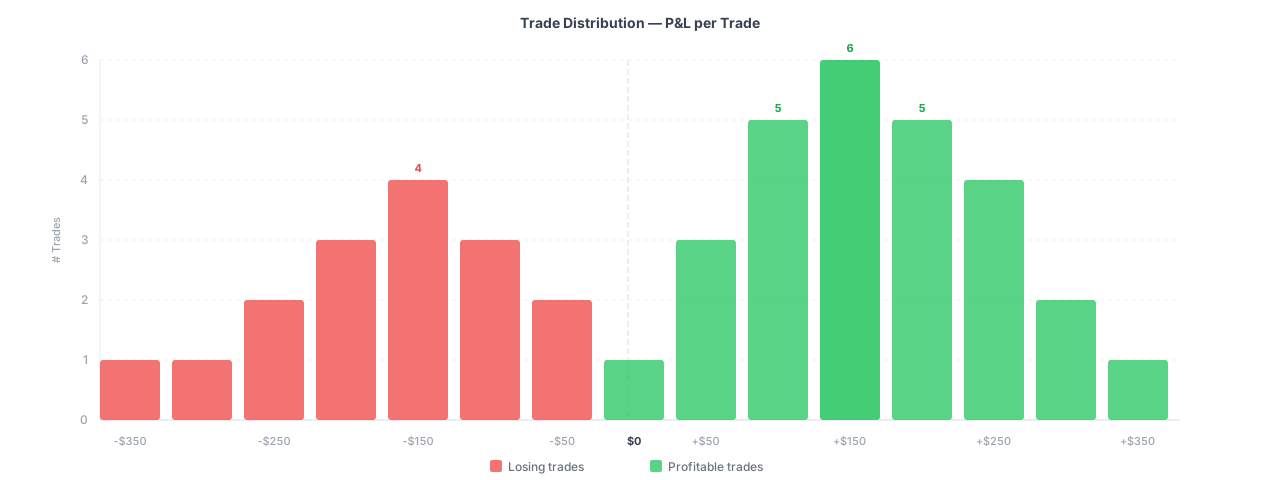
Trade distribution — frequency of trade outcomes by P&L bucket
What to look for
- Right-skewed (long right tail) → a few big winners, many small losses — trend-following profile
- Left-skewed (long left tail) → many small wins, occasional blow-up — mean-reversion gone wrong
- Tight, normal distribution → consistent edge, low variance per trade (ideal for scalping)
- Bimodal → the strategy behaves very differently in two market regimes; worth investigating
A distribution with a clean left cutoff (no extreme losers) combined with a long right tail is the ideal shape for most retail algo strategies. If your left tail extends far, it usually signals missing stop-loss logic.
Building buckets
type Bucket = {
  label: string;   // e.g. "$-200 to $-150"
  from: number;
  to: number;
  count: number;
  isProfit: boolean;
};

function buildDistribution(pnls: number[], bucketSize = 50): Bucket[] {
  if (pnls.length === 0) return [];

  const min = Math.floor(Math.min(...pnls) / bucketSize) * bucketSize;
  const max = Math.ceil(Math.max(...pnls)  / bucketSize) * bucketSize;

  const buckets: Bucket[] = [];
  for (let from = min; from < max; from += bucketSize) {
    const to = from + bucketSize;
    buckets.push({
      label: `${from >= 0 ? "+" : ""}${from}`,
      from,
      to,
      count: pnls.filter((p) => p >= from && p < to).length,
      isProfit: from >= 0,
    });
  }
  return buckets;
}
React + Recharts implementation
import {
  BarChart, Bar, XAxis, YAxis, Tooltip,
  CartesianGrid, ResponsiveContainer, Cell, ReferenceLine,
} from "recharts";

type Bucket = {
  label: string;
  count: number;
  isProfit: boolean;
};

type Props = { data: Bucket[] };

const CustomTooltip = ({ active, payload, label }: any) => {
  if (!active || !payload?.length) return null;
  return (
    <div
      style={{
        background: "#18181b",
        border: "1px solid #3f3f46",
        borderRadius: 8,
        padding: "8px 12px",
        fontSize: 12,
        color: "#e4e4e7",
      }}
    >
      <p style={{ margin: 0, color: "#9ca3af" }}>Bucket: {label}</p>
      <p style={{ margin: "4px 0 0", fontWeight: 600 }}>
        {payload[0].value} trade{payload[0].value !== 1 ? "s" : ""}
      </p>
    </div>
  );
};

export function TradeDistribution({ data }: Props) {
  return (
    <div className="rounded-xl border border-gray-100 dark:border-zinc-800 p-4 bg-white dark:bg-zinc-900">
      <h3 className="text-sm font-semibold text-gray-700 dark:text-gray-300 mb-4">
        Trade Distribution
      </h3>

      <ResponsiveContainer width="100%" height={280}>
        <BarChart data={data} margin={{ top: 8, right: 12, left: 0, bottom: 20 }}>
          <CartesianGrid strokeDasharray="3 3" stroke="#f0f0f0" vertical={false} />
          <XAxis
            dataKey="label"
            tick={{ fontSize: 10, fill: "#9ca3af" }}
            tickLine={false}
            axisLine={false}
            angle={-35}
            textAnchor="end"
            interval={0}
          />
          <YAxis
            tick={{ fontSize: 11, fill: "#9ca3af" }}
            tickLine={false}
            axisLine={false}
            allowDecimals={false}
            label={{
              value: "# Trades",
              angle: -90,
              position: "insideLeft",
              offset: 12,
              fontSize: 11,
              fill: "#9ca3af",
            }}
          />
          <Tooltip content={<CustomTooltip />} cursor={{ fill: "rgba(255,255,255,0.04)" }} />
          <Bar dataKey="count" radius={[3, 3, 0, 0]} maxBarSize={32}>
            {data.map((entry, index) => (
              <Cell
                key={`cell-${index}`}
                fill={entry.isProfit ? "#22c55e" : "#ef4444"}
                fillOpacity={0.8}
              />
            ))}
          </Bar>
        </BarChart>
      </ResponsiveContainer>

      {/* Legend */}
      <div className="flex items-center justify-center gap-6 mt-2">
        <div className="flex items-center gap-1.5">
          <span className="h-2.5 w-2.5 rounded-sm bg-green-500 opacity-80" />
          <span className="text-xs text-gray-400">Profitable trades</span>
        </div>
        <div className="flex items-center gap-1.5">
          <span className="h-2.5 w-2.5 rounded-sm bg-red-500 opacity-80" />
          <span className="text-xs text-gray-400">Losing trades</span>
        </div>
      </div>
    </div>
  );
}
Usage
const pnls = [120, -45, 310, -180, 95, -220, 450, 80, -30, 150, -90, 200];

const distributionData = buildDistribution(pnls, 100); // $100 buckets

<TradeDistribution data={distributionData} />
Choosing the right bucket size
The bucketSize parameter matters more than it looks. Too small and you get noise; too large and you lose shape.
| Total trades | Recommended bucket size |
|---|---|
| < 50 | $100 or 1% of avg trade |
| 50 – 200 | $50 |
| 200 – 1000 | $25 |
| 1000+ | $10 or use a KDE smoothed curve |
Putting them together on a dashboard
Both components are self-contained and accept clean data arrays. A minimal dashboard layout:
import { buildEquityCurve }   from "@/lib/equity";
import { buildDistribution }  from "@/lib/distribution";
import { EquityCurve }        from "@/components/charts/equity-curve";
import { TradeDistribution }  from "@/components/charts/trade-distribution";

export default function Dashboard({ trades }: { trades: Trade[] }) {
  const equityData      = buildEquityCurve(trades);
  const distributionData = buildDistribution(trades.map((t) => t.pnl), 50);

  return (
    <div className="grid grid-cols-1 gap-6 lg:grid-cols-2">
      {/* Equity curve spans full width */}
      <div className="lg:col-span-2">
        <EquityCurve data={equityData} />
      </div>

      {/* Distribution sits in one column */}
      <TradeDistribution data={distributionData} />

      {/* Other stats cards go here */}
    </div>
  );
}
Conclusion
The equity curve and trade distribution histogram are the two charts that immediately separate a serious algo trading dashboard from a simple P&L table. The equity curve tells you when the strategy makes money; the distribution tells you how it makes money. Together they expose curve-fitting, missing stops, regime changes, and genuine edge — before you risk real capital.
Both charts take less than 50 lines of React to implement with Recharts and can be dropped into any Next.js or Vite project without external charting subscriptions.